| CPSC 329 | Software Development | Fall 2026 |
This lab gives you practice applying design patterns to improve the design of existing code. You'll refactor a maze solver to use Strategy and a simple factory, eliminating near-duplicate classes, and refactor a Breakout game to use Decorator so that new kinds of special bricks can be added without changing the existing classes. Along the way, you'll use characterization tests as a safety net to make sure the refactoring doesn't change the programs' behavior and let Eclipse's refactoring tools do much of the mechanical work.
Successful completion of this lab means that you:
Labs are for learning and practice — you may help and be helped by others when it comes to figuring out what to do, but in the end you need to understand and be able to do the things for yourself.
This lab is individual — everyone works with their own repository and does their own refactoring.
You may not use AI to figure out what to do or to do the task for you.
due Fri 10/9 at the start of class
To hand in your work:
Copy your entire ~/cs329/dev/lab6-mazesolver and (if you did Breakout) ~/cs329/dev/lab6-breakout directories into your handin directory. Make sure you end up with lab6-mazesolver and lab6-breakout directories (directly) inside your handin directory and that each contains a src directory (with your code) — you shouldn't have a bunch of stuff loose in the top level of your handin directory or have folders nested deeper.
You have been provided with two complete programs: a maze solver and a game of breakout.
Maze solver: The solver package contains implementations of three maze solving algorithms (depth-first search, breadth-first search, and best-first search); the main package contains the corresponding main programs to run them. The remaining packages provide support code — a parser to read maze description files and a maze data structure — that you shouldn't need to work with directly. The details and tradeoffs of the different maze solving techniques are not the focus of this assignment (so don't worry if you aren't familiar with them), but if you are curious, you'll run the programs to establish a baseline before refactoring — observe how their strategies differ.
Breakout: The provided code is a complete implementation of a basic Breakout game. (There are some quirks with handling ball bounces; it's a basic game.) Move the mouse in and out of the game window to start and pause the game. Control the paddle by moving the mouse left or right — the paddle moves towards the mouse position. (No need to click any buttons.) The provided code is thin on comments but the organization should be reasonably straightforward. The main program is BreakoutMain.
Both programs in this lab make use of JavaFX, so you'll need to configure the Java settings in Eclipse:
Go to Window → Preferences. On the left side, expand "Java".
Choose the main "Installed JREs" entry under "Java".
Select the built-in JDK — it is likely named "jre" and is already checked. Click on it to select it (without unchecking the check box) and click "Edit...".
Fill in the "Default VM Arguments" with
--module-path=/classes/cs329/javafx/lib --add-modules=ALL-MODULE-PATH
Make sure you include the -- (two dashes, no space between) at the very beginning!
Click "Add External JARs...", navigate to /classes/cs329/javafx/lib and select all of the files there.
Click Finish.
Click "Apply and Close" at the bottom of the Preferences window to apply the new settings and close the window.
New projects you create should now be set up for JavaFX.
In this part you'll refactor a maze solver program to avoid redundant code and make it easier to extend.
Create an Eclipse project and share it to a local Git repository:
Create a new Eclipse project named lab6-mazesolver. Remember that the project directory should end up under ~/cs329/dev, not in Eclipse's workspace.
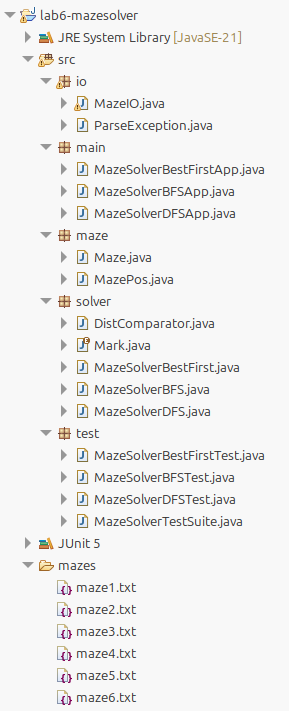
Import all of the files from /classes/cs329/lab6/mazesolver into your project, preserving the directory structure — the maze files should end up in a folder mazes in the top level of your project and the Java files should end up in packages under src. (correct organization)
Fix the build errors in the tests by adding the JUnit 5 library to the project's build path and verify that there are no other error icons shown in the Package Explorer. (If there are JavaFX errors, check that you got things set up correctly in the Setup steps above.)
Confirm that the program runs correctly — run one of the main programs in the main package and load one of the provided mazes. If there are JavaFX errors, check that you got things set up correctly in the Setup steps above.
Create a new (local) Git repository, create/set up .gitignore, and do the initial commit. Include a meaningful commit message (e.g. "Added maze solver starter files").
Much of this lab is about refactoring code to improve its design by following design patterns — there's no change in functionality. To ensure that refactoring doesn't break anything, we can write a set of JUnit characterization tests which capture the application's current behavior and then re-run them when the refactoring is complete.
A set of characterization tests have been provided in the test package. These check the stats produced by the maze solver during the solving process. You'll need to fill in the baseline values:
Open MazeSolverDFSTest and locate the four TODO comments. Replace the 0s with the actual stats: look at the header of checkStats to see what the four values are for, then run MazeSolverDFSApp, load and solve each of the specified mazes, and record the resulting stats.
Do the same thing for MazeSolverBFSTest and MazeSolverBestFirstTest (be sure to run the corresponding main program).
Verify that all the tests pass — you can run all three sets in one step by running MazeSolverTestSuite instead of the individual test classes. This will take a few minutes to complete because the nice-for-display delay between steps is part of the maze solver logic but you should see progress as each test eventually completes. (Such slow-running tests are acceptable for a one-time refactoring safety net — if they were going to be used for regular re-verification of the code, it would be worth redesigning the logic to separate UI-related features from the solver logic.)
Commit the completed characterization tests with an appropriate commit comment.
If you look through the provided code, you'll notice several sets of parallel class names — there are DFS, BFS, and best-first versions of the application (in main), the maze solver itself (in solver), and the tests (in test).
Compare the solver classes:
Select two of the solver classes in the Package Explorer and right-click → Compare With → Each Other for a line-by-line comparison. What varies?
Repeat with one of the same classes and the third. What varies?
Apart from the class and constructor names, all of the differences in the solver classes are in the solve() method and involve the discovered collection — the declaration, the construction, adding a room, taking the next room, and checking if the collection is empty.
Both Strategy and Template Method support encapsulating what varies where the variants are peers. (Different collections of rooms are independent of each other.) Strategy is the better fit here: what varies is only one piece of the behavior — which room is next — and is an aspect of something the solver uses — the collection of discovered rooms — rather than steps in an algorithm — solve() is the same in all three cases, except for the discovered rooms collection. (Template Method would be the better choice if future maze-solving strategies needed to change the algorithm itself and not just the order of rooms.)
Strategy calls for the code structure shown:
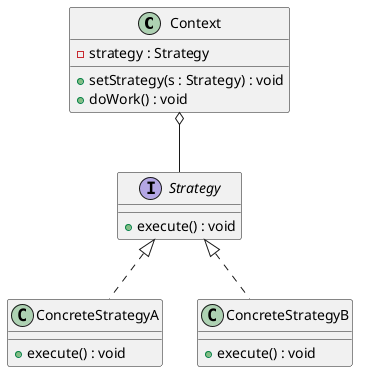
The next several sections go through refactoring the provided code to implement Strategy.
Create an interface Discovered with the methods listed. It should go in the solver package.
      void add ( MazePos pos );
      MazePos remove ();
      boolean isEmpty ();
      void clear ();
Add appropriate comments.
Commit with an appropriate commit comment.
Design notes:
The interface's name (Discovered) describes its role — holding the discovered rooms — rather than the data structure because the particular data structure is exactly what will change in the concrete implementations.
The interface has only the methods the solver needs — adding more would violate ISP by making every implementation support methods that aren't needed.
clear() was added to allow resetting the state if solve() is called multiple times. Previously solve() just created a new data structure instance each time.
Create a class DiscoveredStack which implements Discovered. It should go in the solver package. Hint: in the New Java Class dialog, click Add... next to the Interfaces box to specify that DiscoveredStack implements Discovered and make sure the "Inherited abstract methods" box is checked. This will auto-generate all the necessary method headers so that you just need to fill in the bodies.
Add appropriate comments for the class. (The methods don't need their own — the @Override tag that was added tells Javadoc and anything else reading that information to pull the comments from the parent class/interface.)
The actual collection will be stored as an instance variable. Add a declaration for the stack and a constructor to initialize it to an empty stack.
Finally, fill in the bodies of the four methods. These should all be one-liners that just delegate to the stack.
Implement DiscoveredQueue and DiscoveredPQ similarly. For DiscoveredPQ, look at the creation of the priority queue in MazeSolverBestFirst's solve(( method — a comparator needs to be passed to PriorityQueue to tell it how to order the rooms, and the DistComparator needs to know the maze's goal. DiscoveredPQ's constructor should take the goal as a parameter so it can create a DistComparator and initialize the PriorityQueue instance variable.
Commit with an appropriate commit comment.
Rather than creating this from scratch (and copying over a lot of code from the existing solvers), first turn MazeSolverDFS into a general MazeSolver through a short series of refactorings:
Rename the class to MazeSolver: right-click on MazeSolverDFS.java in the Package Explorer, then Refactor → Rename. Eclipse will update all the code references but you will need to update the class comments manually.
Run MazeSolverDFSTest to verify that everything still works.
Change the local variable type: in solve(), change
Stackdiscovered = new Stack ();
to
Discovered discovered = new DiscoveredStack();
Some of the method calls will break because Discovered and Stack use different names. Fix them.
Run MazeSolverDFSTest to verify that everything still works.
Convert the local variable to an instance variable: select the variable name (discovered) in the declaration and right-click → Refactor → Convert Local Variable to Field... In the dialog:
Note what happened — Eclipse added the instance variable, moved its initialization to the constructor, and renames every use of it in solve. Add a Javadoc comment for the instance variable to match the others.
Clear the collection at the start of solve(): add discovered_.clear(); after resetMarks(). This is needed to make up for the implicit reset that happened by creating a new stack each time.
Run MazeSolverDFSTest to verify that everything still works.
Add a parameter to the constructor: in the constructor, select the expression new DiscoveredStack() and right-click → Refactor → Introduce Parameter... (If you don't see the Introduce Parameter option on the context menu, be sure you've selected the whole expression.) Name the parameter discovered. Eclipse updates all of the constructor calls to also create a new DiscoveredStack to pass in. Check that the parameter type is Discovered and not DiscoveredStack — fix it if needed.
Fix up the imports: right-click on the project in the Package Explorer and choose Source → Organize Imports. The error flags that appeared on MazeSolverDFSApp and MazeSolverDFSText should go away, and as should the no-longer-used import of Stack in MazeSolver.
Back in MazeSolver's constructor, add precondition checks (neither the maze nor the discovered collection should be null) and update the Javadoc.
Run MazeSolverDFSTest to verify that everything still works.
Commit with an appropriate commit comment.
MazeSolverDFS and MazeSolverDFSTest are already done; the refactorings in the previous step means they now correctly uses MazeSolver. For BFS and best-first:
In MazeSolverBFSApp, change the type of the solver_ instance variable to MazeSolver and update its initialization (in loadMaze()) accordingly.
In MazeSolverBFSTest, change everywhere MazeSolverBFS is used to MazeSolver and update the constructor call.
Do the same in MazeSolverBestFirstApp and MazeSolverBestFirstTest.
Fix up the imports: right-click on the project in the Package Explorer and choose Source → Organize Imports.
Delete the old solvers MazeSolverBFS and MazeSolverBestFirst. If anything breaks, you missed something in the previous steps — fix the problem.
Run MazeSolverTestSuite to verify that everything still works. (Fix the problems if not.)
Commit with an appropriate commit comment.
The Strategy refactoring eliminated the nearly-identical solvers but there are still three nearly-identical applications.
Compare the application main programs:
Select MazeSolverDFSApp.java and MazeSolverBFSApp.java in the Package Explorer and right-click → Compare With → Each Other for a line-by-line comparison. What varies?
Repeat with MazeSolverDFSApp.java and MazeSolverBestFirstApp.java. What varies?
There are only two differences: the title of the window and which discovered collection is created. The same thing occurs in the tests — the only difference is the discovered collection.
Why simple factory? A simple factory centralizes object-creation logic that would otherwise be repeated in several places — here, the code in each application and test that chooses and builds a Discovered object. It fits well because the choice is made from a value: the client supplies a SolverType and the factory returns the matching Discovered object without the client needing to know which class that is or what it needs to be constructed.
The tradeoff is that a simple factory isn't closed for modification: adding a new solver algorithm means editing the factory as well as adding a new Discovered class and a new SolverType value. That is acceptable here because the edits are small and in known places, and the clients don't have to change at all. The factory also doesn't limit how the solver can be used — someone who couldn't modify the factory could still create their own Discovered object and pass it to MazeSolver directly.
Simple factory calls for the code structure shown:
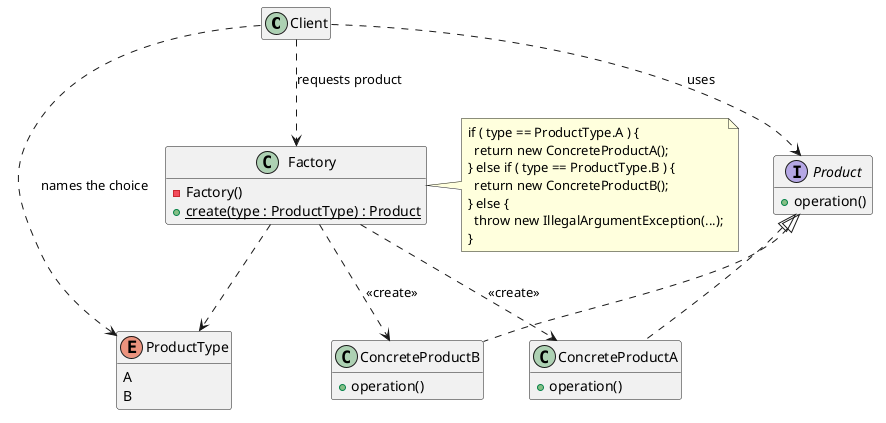
The next several sections go through refactoring the provided code to implement a simple factory.
Clients need a way to tell the factory which type of solver they want without naming a specific Discovered class. Defining an enum instead of using a String or int value makes a bad solver type a compile-time problem rather than a runtime problem. (It also lists all of the valid values in one place.)
Create a new enum named SolverType in the solver package: right-click on solver in the Package Explorer and choose New → Enum.
Copy and paste the following definition for SolverType:
package solver;

/**
 * The available search orders for solving a maze.
 */
public enum SolverType {

	DFS("depth-first"), BFS("breadth-first"), BEST_FIRST("best-first");

	/**
	 * Name to display for this search type.
	 */
	private String label_;

	private SolverType ( String label ) {
		label_ = label;
	}

	/*
	 * (non-Javadoc)
	 * @see java.lang.Enum#toString()
	 */
	public String toString () {
		return label_;
	}
}
This defines three values: SolverType.DFS, SolverType.BFS, and SolverType.BEST_FIRST. Each also has an associated display name which will be used in the UI.
Commit with an appropriate commit comment.
The factory is the one place that will know about the concrete discovered collection classes.
Create a new class DiscoveredFactory in the solver package.
Add the create method: it should take the type of solver to create and the maze as parameters and should return a Discovered object. (Only best first needs the maze goal, but the factory user shouldn't have to know that — providing the whole maze to create lets the factory handle the details of which product needs what and supports future strategies that might need more from the maze.) Create and return the correct kind of Discovered object for each of the three solver algorithms, and throw an IllegalArgumentException if the solver type isn't one of those three. (This is defensive programming to protect against future modifications that add values to SolverType without updating DiscoveredFactory.)
Commit with an appropriate commit comment.
Switch the tests first:
In MazeSolverDFSTest, change the line in createSolver that calls new DiscoveredStack() to instead use the factory.
Do the same for MazeSolverBFSTest and MazeSolverBestFirstTest.
Fix up the imports: right-click on the project in the Package Explorer and choose Source → Organize Imports.
Run MazeSolverTestSuite to verify that everything still works.
Commit with an appropriate commit comment.
The rest of this section is optional — come back if you have time. The remaining step is to create a single application which provides the user with the choice of solvers. This is optional because it requires some UI updates so it is a little more involved than the updates to the tests and it doesn't add anything new in terms of use of the factory.
Turn MazeSolverDFSApp into the general MazeSolverApp:
Rename MazeSolverDFSApp to MazeSolverApp.
Extract the solver setup into a method: creating a solver will soon happen in two places — when a maze is loaded and when the user picks a different solver algorithm — so it should be pulled into its own method to avoid repeated code. In loadMaze(), the solver setup is split up by the canvas sizing code:
	maze_ = MazeIO.loadMaze(selected.getPath());
	solver_ = new MazeSolver(maze_,new DiscoveredStack());
	double cellsize = ...
	canvas.setWidth(maze_.getWidth() * cellsize);
	canvas.setHeight(maze_.getHeight() * cellsize);
	solver_.addPropertyChangeListener(listener -> Platform
	    .runLater( () -> redraw(canvas)));
	redraw(canvas);
This split means it takes a little more effort to extract it:
Move the line solver_ = ... to just above the line solver_.addPropertyChangeListener(...).
Select the three lines now at the end (creating the solver, adding the listener, and calling redraw) and right-click → Refactor → Extract Method... Name the method createNewSolver and make it private. Eclipse makes canvas a parameter and replaces the three lines with a call to createNewSolver().
Add a dropdown to the UI so the user can select the solver:
Add a new instance variable for the dropdown component:
private ComboBoxsolverbox_;
In start(), create the solver dropdown immediately after loadbtn_ and solvebtn_ are created:
	solverbox_ = new ComboBox();
	solverbox_.getItems().addAll(SolverType.values());
	solverbox_.setValue(SolverType.BFS);
	solverbox_.setOnAction(e -> createNewSolver(canvas));
Add the dropdown to the button pane — replace
btnpane.getChildren().addAll(loadbtn_,solvebtn_);
with
btnpane.getChildren().addAll(loadbtn_,solvebtn_,solverbox_);
Fix up the imports: right-click on the project in the Package Explorer and choose Source → Organize Imports.
Use the factory to create the discovered collection instead of the hardcoded DiscoveredStack: in createNewSolver, replace new DiscoveredStack() with
DiscoveredFactory.create(solverbox_.getValue(),maze_)
Fix up the imports: right-click on the project in the Package Explorer and choose Source → Organize Imports.
Lock the dropdown during a solve: changing the solver algorithm mid-solve would replace the solver while the old one is still running. The load and solve buttons are already disabled during a solve, so do the same for the dropdown:
Locate the line that starts solvebtn_.setOnAction in start() and add solverbox_.setDisable(true); after the two lines disabling solvebtn_ and loadbtn_.
Locate the line that starts task.setOnSucceeded in solve() and add solverbox_.setDisable(false); after the two lines enabling solvebtn_ and loadbtn_.
Update the window title: locate the line stage.setTitle("Maze Solver: DFS"); at the beginning of start() and change it to just "Maze Solver".
Delete the extra applications MazeSolverBFSApp and MazeSolverBestFirstApp.
Run MazeSolverTestSuite to verify that everything still works.
Run MazeSolverApp and check what the tests don't: the dropdown lists the three solver applications, the selected solver is used when "solve maze" is clicked, changing the solver after a solve clears the maze display and the stats, and the dropdown is disabled while a solve is running.
Commit with an appropriate commit comment.
This section is optional. You are encouraged to do it if you have time in order to see Decorator in action — there are some subtleties in how all the details come together, and it is important to see those to really understand how Decorator works — but it is not required for full credit on the lab.
The object of the game Breakout is to clear all the bricks from the top of the screen by bouncing a ball off of them. The player moves a paddle back and forth along the bottom of the screen to keep the ball in play; a brick is cleared once it has been hit enough times and the player scores points for each brick cleared. If the ball gets past the paddle, the player loses that ball. The game ends when all the bricks are cleared or the player runs out of balls.
So far the game has only basic bricks — it takes some number of hits to clear them, but all that happens when a brick is cleared is that the player scores some points. In this part you'll refactor the code to allow for special bricks that can make the ball or paddle bigger or smaller, speed the ball up or slow it down, add scoring multipliers, and so on. You'll also add functionality to support ball-resizing bricks.
Create an Eclipse project and share it to a local Git repository:
Create a new Eclipse project named lab6-breakout. Remember that the project directory should end up under ~/cs329/dev, not in Eclipse's workspace.
Import all of the files from /classes/cs329/lab6/breakout into the src folder in your project.
Fix the build errors in the tests by adding the JUnit 5 library to the project's build path and verify that there are no other error icons shown in the Package Explorer. (If there are JavaFX errors, check that you got things set up correctly in the Setup steps above.)
Confirm that the program runs correctly — run BreakoutMain. Move the mouse in and out of the game window to start and pause the game. Control the paddle by moving the mouse left or right — the paddle moves towards the mouse position. (No need to click any buttons.) There are some quirks with handling ball bounces — it's just a basic implementation.
If there are JavaFX errors, check that you got things set up correctly in the Setup steps above.
Create a new (local) Git repository, create/set up .gitignore, and do the initial commit. Include a meaningful commit message (e.g. "Added maze solver starter files").
As with maze solver, this part starts off with some refactoring. A set of characterization tests have been provided to provide a safety net that the refactoring doesn't break anything.
Run BreakoutTestSuite and verify that all the tests pass.
Decorator's intent is to add responsibilities to an individual object at runtime, without changing its class. A decorator wraps an object, has the same interface as that object, passes most calls through to it, and changes or adds to the behavior of a few. Because a decorator looks just like the thing it wraps, decorators can wrap other decorators, so effects stack. That matches what is needed to support special bricks need: effects are added to an existing object during play (e.g. when a resizer brick is cleared, the ball already in play must start behaving differently) and effects combine and accumulate (e.g. clearing two resizer bricks should resize the ball twice, and other extensions, such as a speed-up brick, should combine with resizing). The same reasoning applies to bricks: a special brick is an ordinary brick with its own position, color, points and hits, plus zero or more stackable effects.
Decorator calls for the code structure shown:
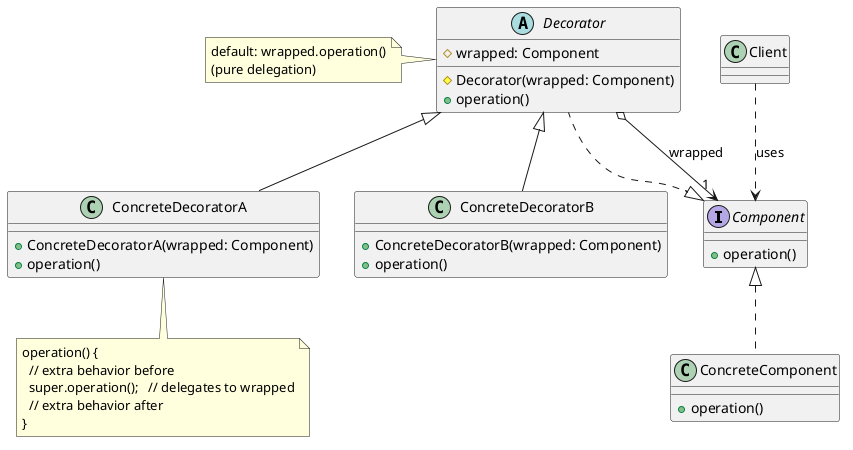
The next several sections go through refactoring the provided code to implement Decorator and to add the resizing effect.
A decorator must be usable anywhere the original object is. So the game needs to depend on a Ball interface, which both the original ball and its decorators implement.
Rename Ball to PlainBall: right-click on Ball.java in the Package Explorer and Refactor → Rename. Leave "Update similarly named variables and methods" unchecked so that methods like getBall() keep their names.
Run BreakoutTestSuite and verify that all the tests pass.
Extract the Ball interface: right-click on PlainBall in the Package Explorer and Refactor → Extract Interface... In the dialog:
Click OK, then check the results:
Add a class comment to Ball describing what it is.
Run BreakoutTestSuite and verify that all the tests pass.
DecoratedBall is the base class for all ball decorators. It holds the wrapped ball and just passes every call through to it — the default is no new behavior. A concrete decorator then overrides only the methods whose behavior it changes. To create DecoratedBall:
Create a new class DecoratedBall. In the dialog box, check "abstract" and click "Add..." next to "Interfaces" to add Ball. Uncheck "Inherited abstract methods" since the delegate methods will be generated below.
Add an instance variable for the wrapped object:
private Ball ball_;
Choose Source → Generate Constructor using Fields..., select ball_, and click Generate.
Choose Source > Generate Delegate Methods..., expand ball_, select all of its methods, and click Generate. Eclipse writes one method per Ball method, each passing the call on to ball_.
Finally:
Run BreakoutTestSuite and verify that all the tests pass.
Commit with an appropriate commit comment.
ResizedBall is a concrete decorator that changes the ball's size by a fixed amount. The amount can be negative, to shrink the ball.
Create a new class named ResizedBall with superclass DecoratedBall. Leave "Constructors from superclass" checked.
Add an instance variable for the resize amount and add an amount parameter to the generated constructor.
Choose Source → Override/Implement Methods..., select getRadius and draw under DecoratedBall, and click OK. Then fill in the bodies: getRadius should return the wrapped ball's radius plus the amount and draw should draw the ball with its current radius (just copy the body of draw from PlainBall). Note: Since the amount the ball is resized by could be negative as well as positive, make sure that getRadius doesn't return a value smaller than 1.
Commit with an appropriate commit comment.
Why override draw as well as getRadius? The inherited draw passes the call to the wrapped ball and PlainBall.draw calls its own getRadius(), not the decorator's inherited one — the wrapped object doesn't know it's wrapped. As a result, a decorator must override every method whose result depends on the behavior it changes.
Bricks follow the same pattern as the ball: an interface, the original class renamed as the plain version, an abstract base decorator, and a concrete decorator. Bricks also get one new operation, decorate, which applies a brick's effect to the ball.
Rename Brick to PlainBrick and extract the Brick interface, as you did with Ball. Check the results:
You should see that PlainBrick implements Brick and BreakoutGame.getBrick and BreakoutMain.draw use Brick.
Check how bricks_ is created in the BreakoutGame constructor. The instance variable should be declared as Brick[][], and the array should be created as new Brick[BLOCKROWS][BLOCKCOLS]. If the creation still says new PlainBrick[...], change it by hand.
Add a class comment to Brick describing what it is.
Run BreakoutTestSuite and verify that all the tests pass.
Now create a decorated brick:
Add a decorate method to Brick to allow bricks to apply their effects to the ball:
	/**
	 * Apply this brick's effect to the specified ball.
	 *
	 * @param ball
	 *          the ball (not null)
	 * @return the ball as decorated by this brick
	 */
	public Ball decorate ( Ball ball );
This results in a compiler error in PlainBrick because it doesn't (yet) implement decorate.
Implement decorate in PlainBrick: click on the error marker in the editor and choose "Add unimplemented methods" from the quick fix options. A plain brick has no effect, so fill in the body of the method to return the ball unchanged: return ball;.
Create a new class DecoratedBrick as you did for DecoratedBall (it should implement Brick). Also add an instance variable for the wrapped object, generate the constructor, and generate delegate methods.
Finally:
Run BreakoutTestSuite and verify that all the tests pass.
Commit with an appropriate commit comment.
ResizerBrick is a concrete brick decorator. When it is cleared, it resizes the ball. It also draws itself differently, so the player can tell which bricks are special.
Create a new class named ResizerBrick with superclass DecoratedBrick. Leave "Constructors from superclass" checked.
Add an instance variable for the resize amount and add an amount parameter to the generated constructor.
Add a second (convenience) constructor — it should take all the same parameters as the PlainBrick constructor plus the resize amount, and then create a new PlainBrick to use for initialization. This means a ResizerBrick can be created in one step instead of always having to create a PlainBrick and then wrap it.
Choose Source → Override/Implement Methods..., select decorate and draw under DecoratedBrick, and click OK. Then fill in the bodies:
decorate should return a new ResizedBall wrapping the ball:
return new ResizedBall(super.decorate(ball),amount_);
where ball and amount_ should be replaced by whatever you named decorate()'s parameter and ResizerBrick's instance variable, respectively.
draw should add a visual indicator to the brick so the play can tell which bricks are special. For example, call super.draw(g) to draw the regular brick, then draw a slight smaller rectangle on top so the effect is a double outline.
Commit with an appropriate commit comment.
It's worth taking a moment to unpack what decorate() is doing and why it wraps super.decorate(ball) rather than just ball. Remember that ResizerBrick extends DecoratedBrick, so super.decorate(ball) invokes DecoratedBrick's version, which passes the call on to the wrapped brick. The wrapped brick is then able to apply its effect to the ball first; ResizerBrick adds its own effect on top of the result. If decorate() instead returned new ResizedBall(ball,amount_), it would apply only its own effect and the effect of any wrapped brick decorator would be lost.
In general a decorator's methods should build on what the wrapped object does — delegate, then add — rather than replace it. That's the key that lets decorators stack! The exception is when a decorator deliberately replaces behavior rather than building on it, such as with ResizedBall's draw() — a resized ball should be drawn as a circle with the appropriate radius, not by adding on to the drawing of the original ball.
Place some resizer bricks:
In the BreakoutGame constructor, find the // TODO set up decorated bricks comment just after the loops that create the bricks. Leave those loops alone and instead add code after them to replace some of the bricks already created with decorated versions of themselves. For example, to make the first column grow the ball and the last column shrink it:
	// make the first and last columns resizer bricks
	for ( int row = 0 ; row < BLOCKROWS ; row++ ) {
		bricks_[row][0] = new ResizerBrick(bricks_[row][0],3);
		bricks_[row][BLOCKCOLS - 1] =
		    new ResizerBrick(bricks_[row][BLOCKCOLS - 1],-2);
	}
This uses the constructor that wraps an existing brick, so each resizer brick keeps the color, points and hit count its row already gave it.
Apply a brick's effect when it is cleared:
In BreakoutTimer.handle (the inner class at the bottom of BreakoutGame), find the // TODO brick has been cleared comment and add the line
ball_ = brick.decorate(ball_);
immediately after the comment. This assignment is important — decorate returns a new object wrapping the old ball and the game must hold on to that new object instead of the old ball so the decoration will have an effect. For a plain brick, decorate returns the same ball, so nothing changes.
Add tests for the new behavior:
Create a new class DecoratorTest and paste in the following:
import static org.junit.jupiter.api.Assertions.assertEquals;
import static org.junit.jupiter.api.Assertions.assertFalse;
import static org.junit.jupiter.api.Assertions.assertSame;
import static org.junit.jupiter.api.Assertions.assertTrue;

import org.junit.jupiter.api.Test;

import javafx.scene.paint.Color;

/**
 * Tests for the ball and brick decorators.
 */
public class DecoratorTest {

	/** Tolerance for comparing doubles. */
	private static final double DELTA = 1e-9;

	@Test
	public void resizedBallAddsToRadius () {
		Ball ball = new ResizedBall(new PlainBall(100,200,6,1.5,-2),3);
		assertEquals(9,ball.getRadius(),DELTA);
	}

	@Test
	public void resizedBallRadiusIsAtLeastOne () {
		Ball ball = new ResizedBall(new PlainBall(100,200,6,1.5,-2),-10);
		assertEquals(1,ball.getRadius(),DELTA);
	}

	@Test
	public void resizesAccumulate () {
		Ball ball = new ResizedBall(new ResizedBall(new PlainBall(100,200,6,1.5,-2),
		                                            3),3);
		assertEquals(12,ball.getRadius(),DELTA);
	}

	@Test
	public void resizedBallStillMovesAndBounces () {
		Ball ball = new ResizedBall(new PlainBall(100,200,6,1.5,-2),3);
		ball.move();
		ball.bounceY();
		assertEquals(101.5,ball.getX(),DELTA);
		assertEquals(198,ball.getY(),DELTA);
		assertEquals(2,ball.getYVelocity(),DELTA);
	}

	@Test
	public void biggerBallReachesPaddleSooner () {
		Paddle paddle = new Paddle(400,595,50,10);   // top at y = 590
		Ball ball = new PlainBall(400,580,6,1,1);
		assertFalse(paddle.isHitBy(ball));
		assertTrue(paddle.isHitBy(new ResizedBall(ball,4)));
	}

	@Test
	public void plainBrickLeavesBallUnchanged () {
		Brick brick = new PlainBrick(100,50,40,20,Color.RED,10,1);
		Ball ball = new PlainBall(100,200,6,1.5,-2);
		assertSame(ball,brick.decorate(ball));
	}

	@Test
	public void resizerBrickResizesBall () {
		Brick brick = new ResizerBrick(100,50,40,20,Color.RED,10,1,3);
		Ball ball = brick.decorate(new PlainBall(100,200,6,1.5,-2));
		assertEquals(9,ball.getRadius(),DELTA);
	}

	@Test
	public void stackedResizerBricksBothApply () {
		Brick brick =
		    new ResizerBrick(new ResizerBrick(100,50,40,20,Color.RED,10,1,3),3);
		Ball ball = brick.decorate(new PlainBall(100,200,6,1.5,-2));
		assertEquals(12,ball.getRadius(),DELTA);
	}

	@Test
	public void resizerBrickActsLikeWrappedBrick () {
		Brick brick = new ResizerBrick(100,50,40,20,Color.RED,10,1,3);
		assertEquals(10,brick.getPoints());
		assertEquals(100,brick.getLeft(),DELTA);
		assertEquals(Brick.TOP,brick.isHitBy(new PlainBall(120,51,6,1,2)));
		assertEquals(0,brick.getHitsLeft());
	}
}
Run both BreakoutTestSuite and DecoratorTest and verify that all the tests pass.
Play the game to check what the tests don't check — that the bricks in the first and last columns have a double outline, that the ball is drawn bigger and smaller after the corresponding resizer bricks are cleared, that resizer effects accumulate, and that losing a ball removes all the effects.
Commit with an appropriate commit comment.